Permission Objects

Anatomy of a Permission Object
A permission is created by combining a user or user group with a namespace, a resource identifier, and a list of allowed actions.
The Passport Service serves as the repository for all permissions. It's the job of each Twinit service to enforce the permissions stored on the Passport Service.
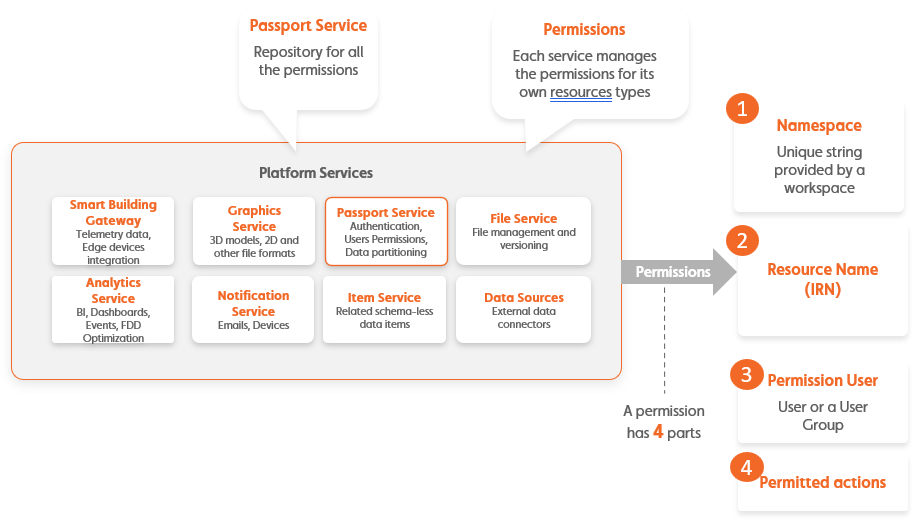
A permission object that can be saved to Twinit will look like:
{
   "_namespace": <the _namespace in which to create the permission>,
   "_resourceDesc": <a description of the resource the permission applies to, an IRN>,
   "_user": <specification of a user or user group by _id>,
   "_actions": <an array of allowed actions>
}
The completed permission object below would give the users in the user group indicated by the _id the permission to READ and EDIT all NamedUserItems in the Item Service in the _namespace Train_WhGy6.
{
   "_namespace": "Train_WhGy6",
   "_resourceDesc": {
      "irn": "itemsvc:nameduseritem:*"
   },
   "_user": {
      "_id": "sdf89safop090qklsad90jklsf",
      "_type": "usergroup"
   },
   "_actions": ["READ", "EDIT"]
}
You could create this permission by using the javascript method for creating Item Service permissions:
IafPermission.createItemPermissions()
or the Item Service endpoint:
PUT /itemsvc/api/v1/permissions
If you are using the IafPermission platform api library, you can reference the _user types from IafPermission.PermConst.UserType.