Oauth2 Implicit Grant
The implicit grant type is used to obtain access tokens from browser clients. Suitable for Single Page Application, the process carried out on client-side and does not involve secret keys. The access tokens that are issued are short-lived and there are no refresh tokens to extend them when they expire, which is main difference here from the authorization code grant type.
Prerequisites
- Platform Application(PA) is required, because PA is considered as a OAUTH2 client. redirect_uri should be registered while creating an app. The registered redirect_uri and appId should be specified in authentication process.
- Familiarize with Oauth2 Implicit flow
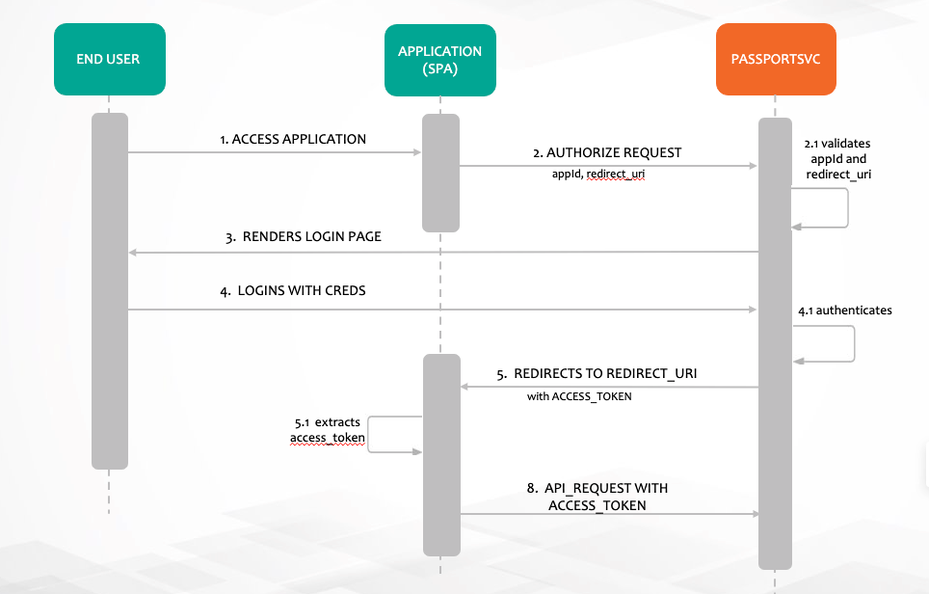
For more info: What is the OAuth 2.0 Implicit Grant Type?
Authentication process
Single Page Applications that use IAF platform-api please look at the section via JSClient using IAF Platform API. Otherwise follow below process.
STEP 1: Direct the User to the Authorization Web Flow
Make a HTTP authorize request from browser with redirect_uri and appId as client_id
https://api.company.com/passportsvc/api/v1/oauth/authorize?response_type=token&redirect_uri=https://apps.company.com/digitaltwin/&client_id=0f02c817-8655-423e-9d22-5439187078f9&scope=read write
All the query params are mandatory here
- - This is the endpoint URI and should be used verbatim.
response_type- Entertoken. This tells the OAuth server that you’re using the Implicit grant type and should be used verbatim.redirect_uri=https://apps.xxxxx.com/oauth2/callback- This is the url you want the user to be redirected after a successful login. Replace the value here with the appropriate URL for your web app. Note that it must be one of the value specified in_redirectUrisin your registered platform applicationclient_id=0f02c817-8655-423e-9d22-5439187078f9Replace the value here with your app’s ID.scope=read write- Keep the scope as read write. Yet to implement authorization based on scope.
Making this request will take the end user to the Sign In page:
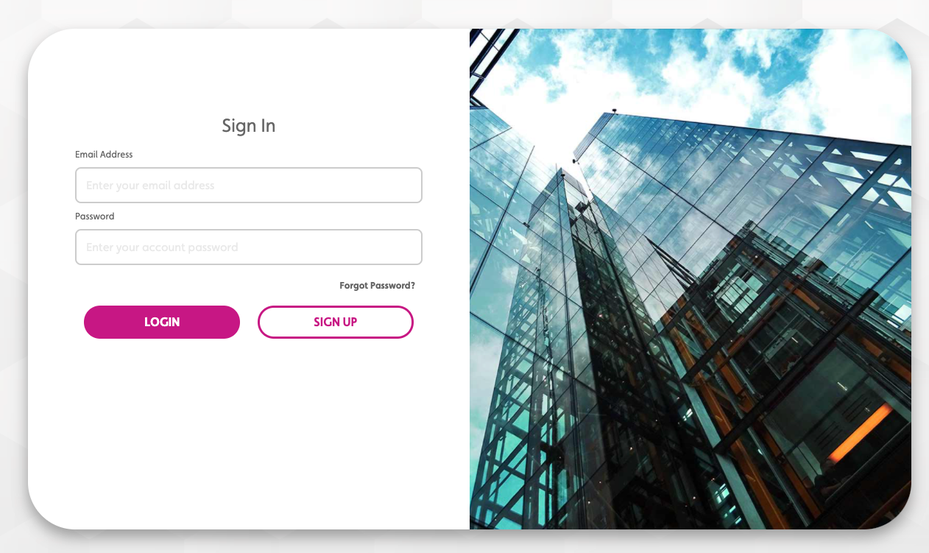
After a successful login, the user will be redirected back to your callback URL (redirect_uri) with the access token included as a fragment of the URL.
STEP 2: Implement Code that Extracts the Access Token
In this example the user was redirected to
https://apps.xxxxxxxx.com/admin/#access_token=eyJhbGciOiJSUzI1NiIsInR5cCI6IkpXVCJ9.eyJleHAiOjE2MjUxNjY5MTgsInVzZXJfbmFtZSI6ImI3MmNkOTAxLTI3MjYtNGIyOS1iOTU5LWZhYTkzNzliZjZjNyIsImF1dGhvcml0aWVzIjpbIlJPTEVfVVNFUiJdLCJqdGkiOiI5MzM5YzA1YS1lN2NhLTQyOTktYmZkOC1lNGYyZjNlZjNkY2IiLCJjbGllbnRfaWQiOiJpbXBsaWNpdC1jbGllbnQiLCJzY29wZSI6WyJyZWFkIiwid3JpdGUiXX0.fwDbLQ2zYktaq85xXYjQUPxkP-3rFCkuafEASQobhKpc5jFF1rcDkF3RdtksB52dhKaCAyfLWrKeoieRLnTsmoXXqZsRmoz63B1BerEIcorKYUIfVoTuG850rFoIERMnlY6JSV6pJG1-fhUtayVrj6I8LKPxjFHlKrs71f8QogBAy0irTzNdVRIjjXKaGeGFCQjm3gx1aL0EDesbH5rSVFhyKXF0WoYK9zGiMO85uMFocghXITgB2xc850EBm-6AvY_7gP-bWLaBeqKHIAMOyKj8xNa7DbYzRKvyM_oyaTfzGwVSUZNNXnNcKm2SEYWjOPTIt3OEpPsLOmCH-DTgPw&token_type=bearer&expires_in=43199&user_name=b72cd901-2726-4b29-b959-faa9379bf6c7&jti=9339c05a-e7ca-4299-bfd8-e4f2f3ef3dcb
The web app then extracts the fragment access_token and use it in Authorization header to make further requests to platform REST APIs.
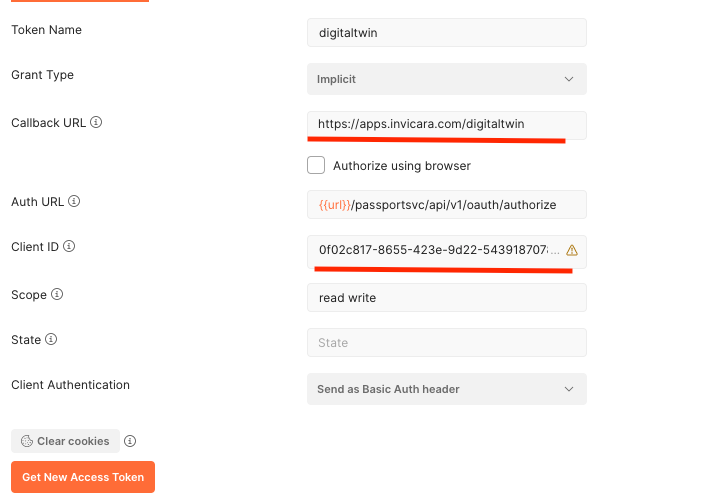
via POSTMAN
- Goto
Authorizationtab - Choose OAuth2.0
- Fill the appropriate values as below, Please have valid app id as client ID and registered
redirect_uriin callback url. - Click
Get New Access Tokenbutton
via JSClient using IAF Platform API
JS clients that uses IAF shall pass an additional argument appId to IafSession.getAuthUrl as below get Authorize url in the application.
IafSession.getAuthUrl('https://apps.company.com/digitaltwin', '0f02c817-8655-423e-9d22-5439187078f9')
After a successful log in, the access _token is extracted from the fragment and it is used in Autorization header to make further requests to platform REST APIs.