IafViewer
Overview
The IafViewer React component allows you to explore and manipulate 3D models using a powerful set of viewing tools and visual assists. For example, you can use it to view a BIM model in 3D space and interact with it using a range of tools.
The Model Navigator page in the Reference app, is built using the IafViewer component. Refer to the section on the Reference app for more information.
IafViewer UI
Figure: IafViewer interface elements
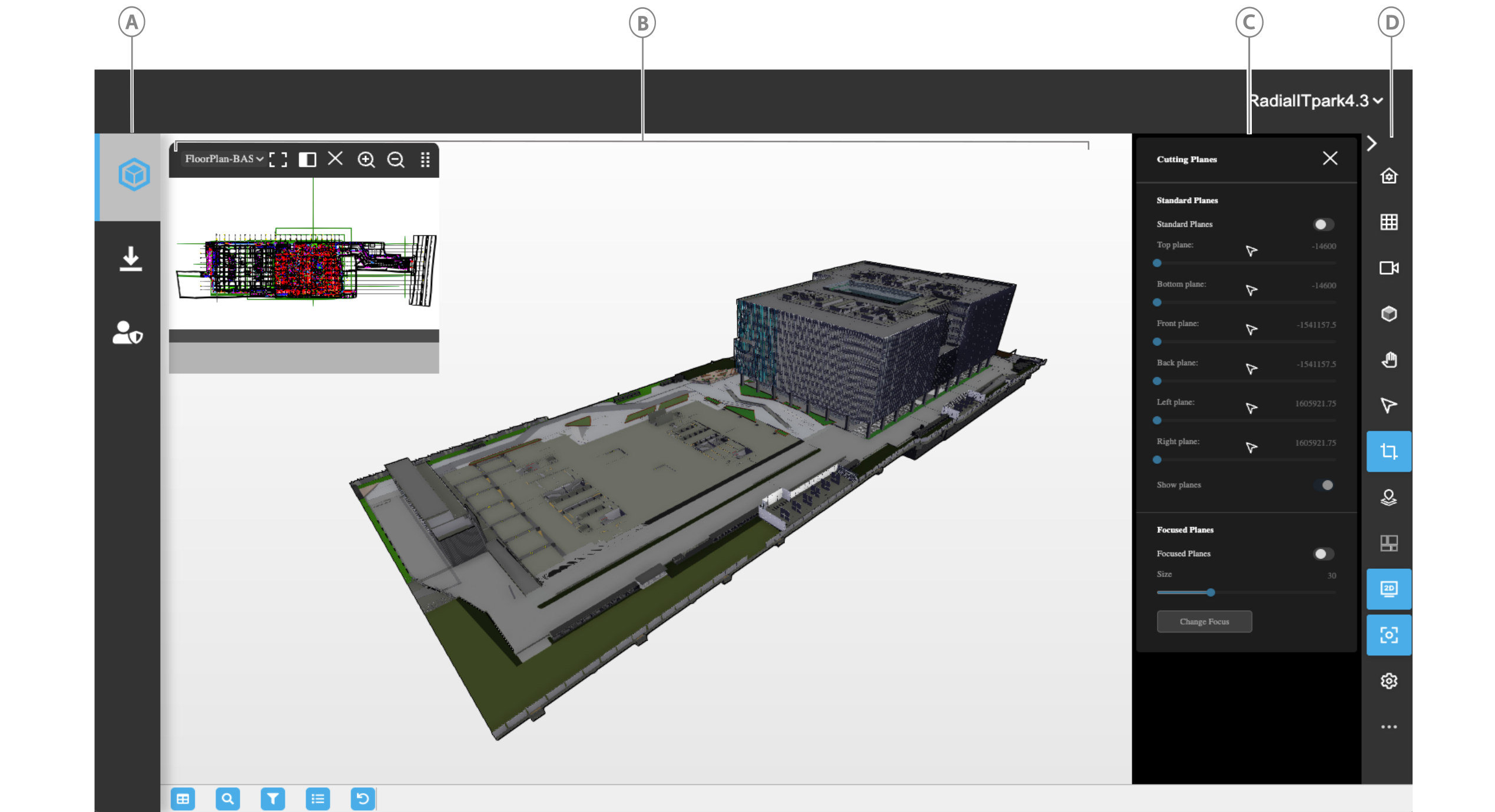
| Callout | Element | Description |
|---|---|---|
| A | Viewer page icon | Click to open the Viewer page |
| B | 3D viewer | Interact with the model |
| C | Configuration pane | When you click a tool in the toolbar, you can further configure the tool's settings in the Configuration pane. |
| D | Toolbar | Click a tool to use it in the IafViewer. For more information on each tool, see IafViewer toolbar icons |
IafViewer toolbar icons
| Element | Icon | Description |
|---|---|---|
 | Reset view | Reset the viewer to the default coordinates. |
 | Projection | Configure camera projection mode for depth (Perspective) or parallel (Orthographic). |
 | View | Click to select from the available views, such as front, back, top, and bottom views. |
 | Shading | Enable and configure model shading. |
 | Navigation | Select a navigation modality, such as pan, orbit, or walk view. |
 | Measurement and annotations | Measure the distance between two points and configure the measurement settings. Add annotations to the 3D model such as lines, geometrical shapes, text callouts, and graphics. |
 | Animations | Click to run animations. For more information, see Animations. |
 | Cutting Plane | Cut the model by a horizontal or vertical plane, either by coordinates or by point of mouse click. For more information, see Cutting Planes pane. |
 | GIS Launcher | Activate the GIS functions. For more information, see Geographic Information System (GIS) feature. |
 | 2D Viewer | View a flat 2D representation of the model. |
 | Focus Mode | Click to zoom in and focus on the selected model element. |
 | Viewer customization | Drag and drop the tools you want to appear in the toolbar for a given setting. |
 | Settings | Configure the general and effect settings. |
 | Visibility utilities | Isolate selected model elements, hide the selection, or show all model elements. This option does not appear in the toolbar by default; to enable it, from the toolbar, click the Settings icon, then enable Utilities. |
 | Model composition | Compose which parts of the model you want to load to optimize loading times for your use-case. For more information, see Model composition. |
Main features of IafViewer
The main features offered by the IafViewer are:
Click on any feature for more information.
React component
For more information on installing, importing, and configuring the IafViewer React component, see IafViewerDBM component.
React selection handling
Selection handling refers to the handling of element click events in the IafViewer. To enhance React best practices, promote a more reactive data flow, and provide a more maintainable and efficient codebase, from platform v4.3 and later, implement the React selection handling enhancements.
Callback mechanism
Any selection directly made within the IafViewer component triggers a callback to the application, passing the selected elements for processing. This ensures a more reactive response to user interactions and follows the principles of one-way data flow in React.
React selection handling workflow
- User Interaction in IafViewer: In the IafViewer component user interface, a user makes element selections.
- Callback to application: Upon a selection event, the IafViewer component sends a callback to the application, providing details about the selected element.
- Application Response: The application receives the callback and processes the selected element, ensuring one-way data flow.
Note: For more information on using the IafViewer React component refer to the IafViewer page in the APIs section.
Utility function commands
For more information on utility functions for the IafViewer component, see IafViewer commands.